
Snippet Usage
Build a Breakdown that shows which Snippets agents use and how much they edit them.
Overview
This Breakdown shows which Snippets your human agents send, how many agents use each one, and how much they edit it before sending. Use it to decide which Snippets to keep, rewrite or retire. A Snippet that agents edit heavily usually needs rewriting.
Quiq records this data starting October 31, 2026, so set the report's date range to start on or after that date.
Creating your Report
1. Navigate to Reports > Insights > Breakdowns and click + New Report.
2. On the Agent message authored event, break the report down by event.contentSource.
3. Click + Add Another and, on the Agent message authored event, break down by context.message.msgDefinitionId. Click Create.
4. Add the Agents Using, Content Modified and Sent Unchanged columns. For each column's settings, see Agents Using, Content Modified and Sent Unchanged.
5. Click the Message Catalog row. Each row now shows one Snippet by its label, followed by the start of its ID. Two Snippets with the same label show as separate rows.
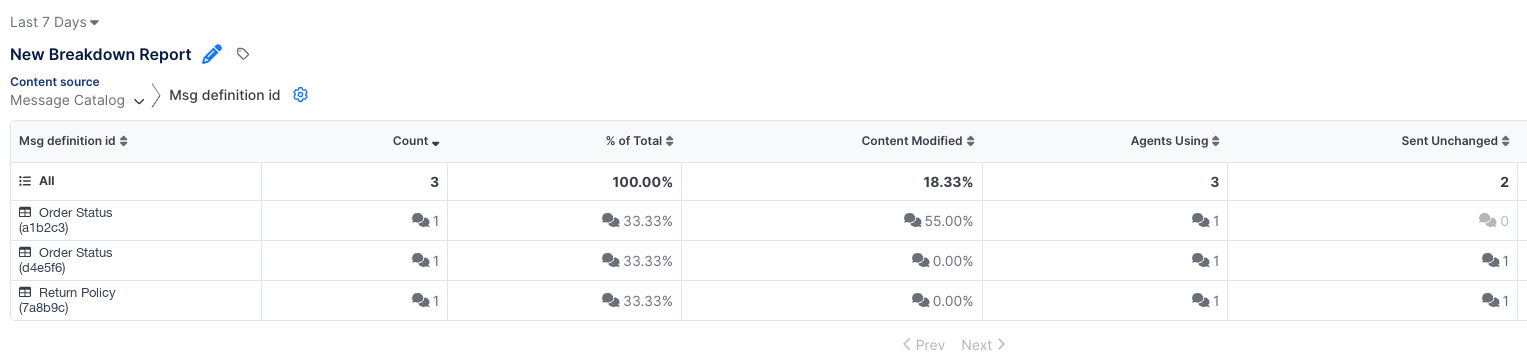
6. Rename the report, for example "Snippet Usage", and click Save.
To see agents' personal Snippets instead, click the Personal Snippet row in step 5.
Using your Report
- Count shows how often each Snippet is sent. Snippets with a low count are candidates to retire.
- Agents Using shows whether a Snippet is used across the team or by one or two agents.
- Content Modified and Sent Unchanged show how much agents edit each Snippet. A Snippet with a high Content Modified is one agents keep rewriting.
Click any row to see the messages behind it. The Event List shows the Snippet as it was loaded and the message as it was sent, so you can see what agents change. Because this is message text, it can include customer details, so leave the Event List out of reports and screenshots you share.
If you use the AI Connector, your AI assistant can work with the same data. For example, ask it which Snippets agents edit most before sending.
Updated 2 days ago